


and What to Do Instead
Even the most visually stunning websites can fail at what matters most — converting visitors into customers. In 2026, conversion isn’t about aesthetics alone — it’s about psychology, speed, messaging, trust, and experience. In this article, we break down the top 10 reasons your website looks great but isn’t converting — with actionable fixes aligned with modern CRO, UX, and search trends.
Introduction: Why Looks Aren’t Enough in 2026
When most business owners say, “My website looks good,” they usually mean it has a nice layout, colors, and images. But conversion — turning visitors into leads, sales, or subscribers — is about strategic communication, user motivation, and frictionless interaction.
A professional-looking website without strong conversion mechanics is like a beautiful storefront with no signage, no clear direction, and no compelling reason to enter.
In this post, we’ll cover the 10 most common reasons your website may be failing to convert in 2026, and practical steps you can take to fix each one.
1. Weak or Unclear Value Proposition
Problem:
Visitors can’t instantly understand what you offer and why it matters.
Why This Hurts Conversions:
In under 3 seconds, users decide whether a page is worth their attention. If your headline, sub-headline, or hero section doesn’t clearly articulate who you help, what you do, and what makes you different, people bounce.
Signs You Have This Problem:
- Generic headlines like “Welcome to Our Website”
- No clear descriptions above the fold
- Multiple competing messages that confuse rather than inform
Fix It With:
✔ A precise, benefit-driven headline
✔ A supporting sub-text that explains your main solution
✔ A one-line summary showing why you’re different (unique selling proposition)
Example SEO Focus:
“Professional marketing services that double lead conversion — without increasing ad spend.”
2. Slow Loading Speed — The Silent Conversion Killer
Problem:
Beautiful sites with heavy images, animations, and scripts load slowly, especially on mobile.
Why This Hurts Conversions:
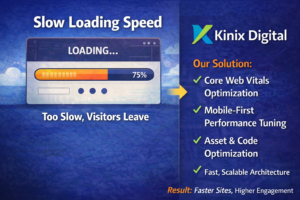
Google and users both penalize slow loading. In 2026, Core Web Vitals remain critical for SEO and user satisfaction. Users expect pages to load within 2 seconds or less. Every additional second increases bounce rates and reduces conversion rates.
Common Causes:
- Unoptimized media (large images/videos)
- Bloated JavaScript or third-party plugins
- Poor hosting or server response times

Fix It With:
✔ Compress images + use modern formats (WebP/AVIF)
✔ Enable lazy loading
✔ Reduce unnecessary scripts and plugins
✔ Use a good CDN + caching
SEO Keywords to Target:
“fast loading website best practices”
“Core Web Vitals optimization 2026”
3. Poor Website Navigation and Structure
Problem:
Visitors get lost, overwhelmed, or confused because your site hierarchy isn’t intuitive.
Why This Hurts Conversions:
A professional design only matters if users can find what they need quickly. Confusing navigation increases cognitive load — and users hate thinking.
 Symptoms:
 Symptoms:
- Too many menu items
- Misleading labels (e.g., “Services” that don’t clearly indicate offerings)
- No clear path to conversion
Fix It With:
✔ Simplify navigation (top 5 or fewer items)
✔ Use descriptive labels (e.g., “Start Free Trial” instead of generic “Products”)
✔ Add breadcrumbs and consistent footer links
SEO Keywords:
“website navigation best practices”
“information architecture for conversion optimization”
4. Weak or Missing Calls-to-Action (CTAs)
Problem:
No clear instruction on what the visitor should do next.
Why This Hurts Conversions:
Great design without strong CTAs leaves users wondering, What now? A CTA like “Learn More” isn’t compelling; “Get Your Free Audit Today” is.
Fix It With:
✔ Action-oriented CTAs
✔ Contrasting buttons that stand out visually
✔ Use urgency or value (e.g., free download, limited offer)
Good CTA Examples:
- Start Your Free Trial
- Get a Personalized Quote
- Book Your Free Strategy Call
SEO Keywords:
“high converting CTA examples”
“CTA best practices 2026”
5. Lack of Trust Signals and Social Proof
Problem:
Visitors don’t trust your brand enough to take action.
Why This Hurts Conversions:
Trust signals like testimonials, case studies, reviews, certifications, and security badges reduce anxiety and increase credibility. Without them, users hesitate.
Common Missing Elements:
- No customer testimonials
- No real use cases or results
- No badges for security / compliance
- Fix It With:
- ✔ Add honest testimonials with names/photos
✔ Include case studies with measurable results
✔ Show ratings from review platforms
✔ Add trust badges (SSL, industry certifications) - SEO Keywords:
“social proof examples for websites”
“trust signals in conversion optimization”
- 6. Messaging Doesn’t Match User Intent
- Problem:
- Your homepage speaks to everyone but resonates with no one.
- Why This Hurts Conversions:
- Users arrive with intent — they may want quick answers, a specific service, pricing, or support. If your messaging doesn’t align with their expectations, they leave.
- Examples of Bad Messaging Matches:
- Generic branding over solution-focused content
- “We’re the best…” rather than “We solve your problem…”
- Not targeting primary audience segments
Fix It With:
✔ Segment content based on user goals (e.g., enterprise vs small business)
✔ Use customer-centric language
✔ Create landing pages optimized for specific intents (pricing, features, support, demos)
SEO Keywords:
“user intent SEO 2026”
“conversion copywriting best practices”
7. Overuse of Fancy Design Over Usability
Problem:
Complex animations, auto-play videos, and ultra-stylized layouts distract from action.
Why This Hurts Conversions:
Design trends come and go, but usability is timeless. Elements like heavy parallax effects or distracting auto-plays can:
- Slow down the site
- Distract from conversion goals
- Create cognitive overload
Fix It With:
✔ Use simple, effective design that supports clarity
✔ Ensure every visual element serves a purpose
✔ Test removing non-conversion elements
SEO Keywords:
“UX versus UI differences”
“minimal design for conversions”
8. Lack of Personalized Experience
Problem:
The website feels generic — no dynamic content, no personalization.
Why This Hurts Conversions:
In 2026, personalization isn’t a luxury — it’s expected. Users want experiences tailored to their:
- Geography
- Behavior (first-time vs returning visitor)
- Stage in the buyer journey
Examples of Personalization:
✔ Show different CTAs for new vs existing users
✔ Highlight content based on user behavior
✔ Localize content for regions
Fix It With:
✔ Behavioral triggers
✔ Dynamic content based on user segments
✔ A/B testing for personalized journeys
SEO Keywords:
“personalized website experience”
“dynamic content for conversions”
9. No Clear Conversion Path / Funnel
Problem:
You have multiple calls-to-action but no structured funnel guiding users from awareness to decision.
Why This Hurts Conversions:
Conversion isn’t one click — it’s a process. Without a defined funnel, users may never reach your most valuable conversion points.
Typical Funnel Issues:
- No lead magnets or gated assets
- No mid-funnel engagement (nurturing emails, retargeting)
- No exit intent offers
Fix It With:
✔ Define a clear funnel: Awareness → Consideration → Conversion
✔ Add lead magnets, quizzes, checklists
✔ Use retargeting and email automation
SEO Keywords:
“conversion funnel optimization”
“lead nurturing strategies 2026”
10. Poor Mobile Experience
Problem:
Your site looks good on desktop but is frustrating on mobile.
Why This Hurts Conversions:
Mobile traffic continues to dominate. A site that isn’t fully optimized for small screens loses conversions fast.
- Common Mobile Issues:

- Tiny buttons and links
- Unreadable text
- Slow mobile loading
- Popups that cover content

Fix It With:
✔ Mobile-first design approach
✔ Thumb-friendly buttons
✔ Responsive layouts with clear hierarchy
✔ No intrusive popups
SEO Keywords:
“mobile-first design for conversion”
“responsive website best practices”
Bonus — 2026 CRO & SEO Trends You Must Know
Conversions in 2026 aren’t just about pages — they’re about experience, context, and engagement. Here are trends shaping the year:
AI-Driven Optimization
AI tools can analyze behavior and automatically adjust layouts, headlines, and content based on real-time performance.
Voice and Conversational UX
Users increasingly interact via voice search and AI assistants. Websites with conversational interfaces and clear question-based structures see better engagement.
Micro-Interactions for Engagement
Subtle animations — not flashy ones — that reward user interaction (e.g., button hover, scroll cues) improve stickiness and conversions.
Data Privacy Alignment
Clear privacy notices, consent flows, and transparent data usage build trust — an SEO and CRO advantage.
Zero-Party Data Capture
Offering real value in exchange for direct user data (preferences, goals) increases personalization without privacy backlash.
How to Diagnose Your Conversion Gaps (Step-by-Step)
Use this checklist when auditing your website:
- First Impression Test:
Does your headline communicate value in <5 seconds? - Speed Audit:
Test using Google PageSpeed / Core Web Vitals — aim for 90+ scores. - Navigation Flow:
Can a user find your main offer in <3 clicks? - CTA Clarity:
Is every page driving toward a measurable action? - Trust Signals:
Do you show proof of success and credibility? - Mobile Quality:
Does the site look and feel intuitive on phones? - Behavior Analysis:
Use heatmaps to see where users drop off. - Funnel Mapping:
Are users progressing from awareness to decision?
Conclusion: Conversion Is More Than Design
A professional-looking website is a foundation — but without clarity, speed, trust, and purpose-driven design, it won’t turn visitors into customers.
To boost conversions in 2026, focus on:
- Clear value communication
- Faster user experiences
- Trust and personalization
- Structured conversion paths
- Mobile-optimized journeys
By fixing the issues above, you’ll turn a good-looking website into a high-converting business engine.
Want a Free Website Conversion Audit?
If you want a tailored breakdown of what’s stopping your website from converting — I can help!
Just reply with your website URL and the main goal (leads, sales, bookings, etc.), and I’ll provide a free actionable audit.